 projects / nix-env-apps / summary
| description | Manage declarative nix-env user environments with a GUI |
| last change | Fri, 10 Apr 2026 17:18:08 +0000 (10:18 -0700) |
| URL | https://git.scottworley.com/pub/git/nix-env-apps |
A simple GUI to make managing declarative nix-env easier
It has two buttons: “Edit Configuration” and “Apply Configuration”
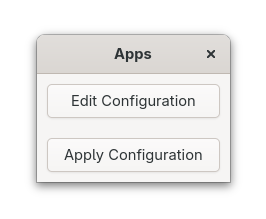
The “Edit Configuration” button launches an editor on
~/.config/nixpkgs/overlays/userPackages.nix, creating it with a
useful template if it doesn’t exist. All you have to do is put the
applications you want installed between the [ ] brackets. For example,
to add Firefox and LibreOffice, you’d type firefox and libreoffice
where shown here:
final: prev: {
  userPackages = final.buildEnv {
    name = "userPackages";
    paths = with final; [

      firefox
      libreoffice

    ];
  };
}
Remember to save before pressing “Apply Configuration”!
The “Apply Configuration” button runs nix-env -riA nixos.userPackages,
which makes your changes take effect. Note that this removes any
other packages that you may have installed imperatively with nix-env -i.
Prefer declarative installation by listing everything you want installed
in the “Edit Configuration” configuration file!
| 6 months ago | v1.1.0 | | commit | shortlog | log | ||
| 13 months ago | v1.0.2 | | commit | shortlog | log | ||
| 13 months ago | v1.0.1 | | commit | shortlog | log | ||
| 13 months ago | v1.0.0 | | commit | shortlog | log |
| 6 months ago | master | shortlog | log | tree |